
 SG777
SG777 Promotion
 Slot Game
 Live Game
 Fishing Game
 e-sport
 Sabong Online
 Poker Online
Withdrawal – How to Withdraw Money from Sg777 via Gcash and Maya
After a big win at Sg777, ready to withdraw your winnings? This guide will show you how to easily cash out from your Sg777 account using the two most popular payment methods: Gcash and Maya. With just a few simple steps, you can withdraw your funds quickly, securely, and completely online.
Why Withdraw Using Gcash and Maya?
Both Gcash and Maya are widely trusted e-wallets in the Philippines, and are highly recommended by Sg777 players for several great reasons:
- Fast processing – receive your funds in minutes
- High security – no need to expose bank account details
- No paperwork – fully digital, straight from your phone
- Easy transaction tracking – monitor your balance and history anytime
Step-by-Step Guide to Withdraw via Gcash at Sg777
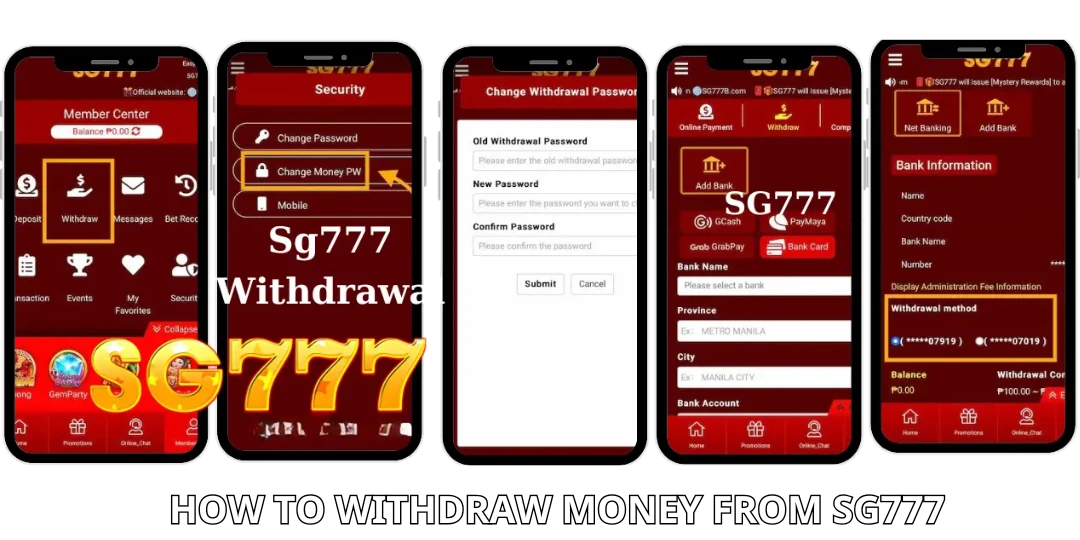
- Step 1: Log in to your account
Visit the official Sg777 website and log in to your account.
- Step 2: Go to the “Withdraw” section
From your profile dashboard, click on “Withdraw” to begin.
- Step 3: Select Gcash as your payment method
Choose Gcash from the list of available withdrawal options.
- Step 4: Enter the withdrawal amount
Type in the amount you want to withdraw. Make sure your account balance is sufficient.
- Step 5: Provide your Gcash details
Enter your registered Gcash mobile number (must match the personal details you used on Sg777 for security reasons).
- Step 6: Confirm withdrawal request
Review all details and click “Confirm”. Your request will typically be processed within 5 to 15 minutes depending on system traffic.
Step-by-Step Guide to Withdraw via Maya at Sg777
- Step 1: Log in to your Sg777 account
Use your device to access and log in to your Sg777 gaming account.
- Step 2: Access the “Withdraw” menu
Navigate to the “Withdraw” section from your account menu.
- Step 3: Choose Maya as your withdrawal method
Select Maya from the payment options list.
- Step 4: Enter the amount and account information
Fill in the amount you wish to withdraw and provide the Maya-linked phone number.
- Step 5: Submit your withdrawal request
Double-check all the information, then confirm the request. The funds will be transferred to your Maya wallet shortly after approval.
Important Notes When Withdrawing from Sg777
To ensure your withdrawal goes smoothly, keep these tips in mind:
- Fulfill any wagering requirements if you’re withdrawing bonus-related funds.
- Your Gcash or Maya account must match your registered name on Sg777.
- Do not use third-party e-wallets, as they may cause delays or rejections.
- Processing time is typically 5–30 minutes, but may vary during peak hours.
- Save your transaction reference or screenshot in case you need support later.
Conclusion
Withdrawing your winnings from Sg777 using Gcash or Maya is fast, safe, and convenient. You don’t need to go through complex bank procedures — just a few taps on your device and your funds will be on their way.